Instant Access
Your Rooster Bet account opens in one step from any modern browser, with no app download required to reach your balance or place a bet.
Login at Rooster Bet: Quick Account Access
Access your account, your balance, your active bonuses, and the sportsbook from any browser in seconds.
Protect Your Rooster Bet Account
What You Should Do
What You Should Avoid
Why Your Login Experience Matters
Instant Access
Your Rooster Bet account opens in one step from any modern browser, with no app download required to reach your balance or place a bet.
Secure Sessions
Every login is protected by SSL encryption and, if enabled, two-factor authentication to guard your balance and personal information.
Mobile Sign-In
The Rooster Bet mobile site adapts to any screen size, so your email and password get you in just as quickly on an iPhone or Android device as on a desktop.
Rooster Bet uses a standard email-and-password login that works in any modern web browser without requiring a separate application.
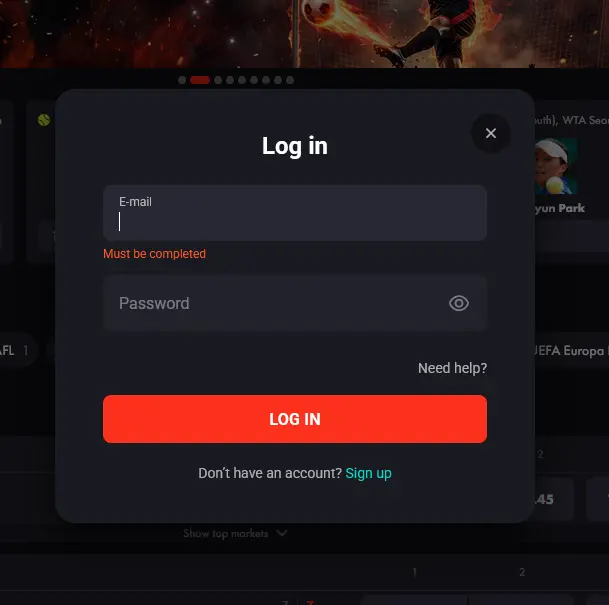 Your registered email address and the password you set during registration are the only credentials needed. If you opted in to two-factor authentication during setup, you will also need to enter the verification code sent to your phone before your session opens.
There is one login method across all platforms: the same email and password combination works on desktop, the mobile browser, and any tablet. Rooster Bet does not currently offer social login or single sign-on via Google or Apple accounts, so your roosterbetaussie.com credentials are self-contained.
Open your preferred desktop browser and navigate to roosterbetaussie.com. Click the LOG IN button in the top-right corner of the homepage. Enter your registered email address and password in the fields that appear, then click the red LOG IN button. If a field is empty the form flags it with a Must be completed message. Your account dashboard, showing your balance, active bonuses, and recent transaction history, will load within a few seconds.
Open Safari, Chrome, or your preferred mobile browser on your iPhone or Android device and go to roosterbetaussie.com. The site detects your screen size and switches to the mobile layout automatically. Tap Log In, enter your email and password, and tap the red LOG IN button. The mobile layout keeps your account balance and cashier within a single tap of the main navigation.
Rooster Bet does not have a dedicated native app available on the App Store or Google Play. Instead, use the mobile browser login method described above, which provides the same account access, game lobby, live sportsbook, and cashier. For a shortcut, add roosterbetaussie.com to your home screen via your browser’s Share or Add to Home Screen option to create an icon that launches the site directly.
The security of your Rooster Bet account rests on the strength of your login credentials and the optional controls you enable after registration. Dama N.V., the operator behind the platform, applies SSL encryption to every session, which means your login data travels in encrypted form between your browser and the server.
Two-factor authentication is available as an additional layer: when enabled, a one-time code is sent to your registered mobile number each time a new login is initiated, so a stolen password alone cannot open your account. You can switch 2FA on from the security section of your profile settings. Biometric authentication (fingerprint or Face ID) depends on your device’s browser; modern mobile browsers on iOS and Android support biometric autofill for saved credentials, which can speed up mobile logins without reducing security.
The most frequent reason a login fails is a mismatch between the email address or password on file and what was typed. Check that your email address is entered exactly as it was registered, including any dots or plus signs, and that the password is correct by using the Show Password toggle before submitting. If your keyboard language has switched, certain characters may not type as expected.
A second common cause is a session that has not fully ended on another device. Clearing your browser’s cookies and cache for roosterbetaussie.com, then reloading the login page, resolves most persistent session errors. If you are accessing the site from an IP address or device you have not used before, you may receive an additional verification prompt.
If you have entered the wrong password several times in succession, the account will lock temporarily as a security precaution. To unlock it, contact the support team via live chat on the site or email [email protected]. A human agent will verify your identity and restore access, typically within a short period during standard support hours.
For forgotten passwords, the Need help link on the login window sends a reset link to your registered email. If you no longer have access to that email address, reach out to support with your registered name and any additional verification details they may request.
Registration at Rooster Bet takes only a few minutes. You will need to provide your email address, a password, your phone number, your country and your account currency during sign-up.
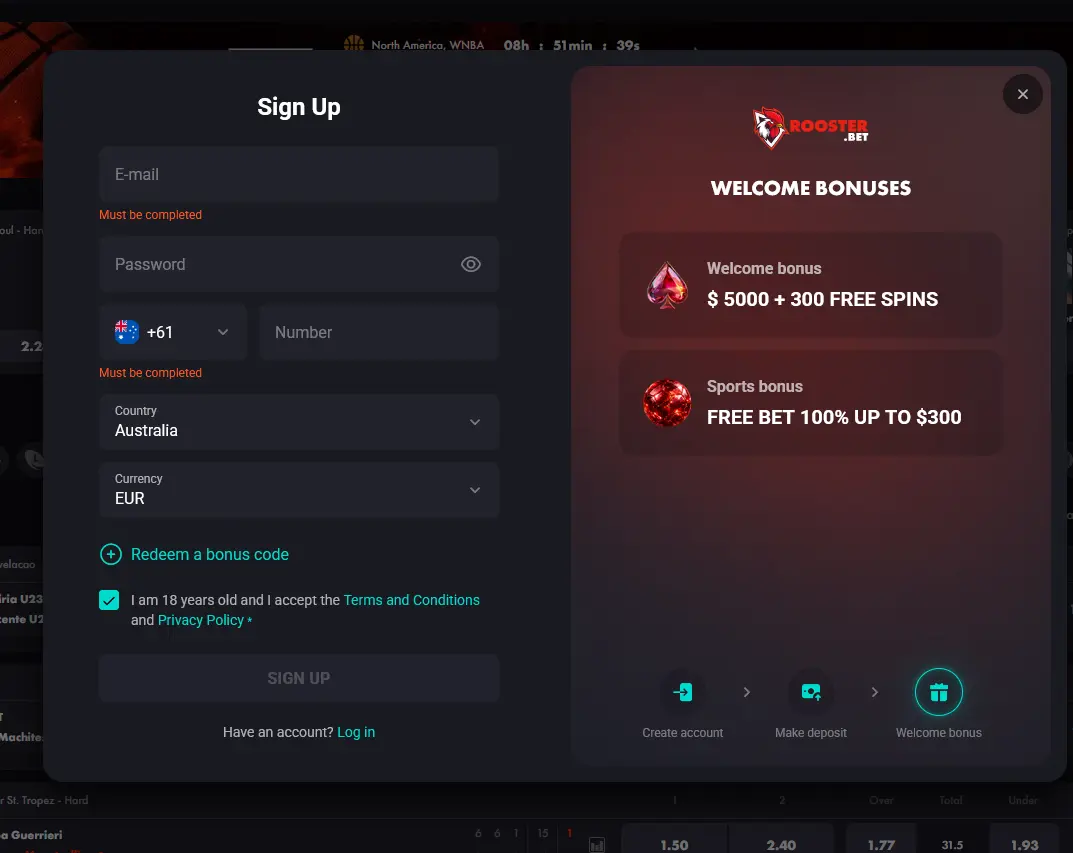 Once your account is open, you can make your first deposit and access the four-stage welcome package worth up to $5,000 plus 300 free spins. Before your first withdrawal, KYC verification will be required: an Australian driver’s licence or passport plus a recent utility bill or bank statement will be requested to confirm your identity and address. The minimum age to hold an account is 18.
Login Questions Answered
Click the Need help link under the password field, enter your registered email address, and follow the reset link sent to your inbox. Create a new password and log in using the updated credentials.
Yes. Rooster Bet does not have a native iOS or Android app, but the mobile-optimised website works in Safari, Chrome, and other modern mobile browsers. Enter the same email and password you use on desktop.
Contact Rooster Bet support via live chat at roosterbetaussie.com or by emailing [email protected] with your registered details, and a human agent will unlock your account after verifying your identity.
No. The terms and conditions permit one account per player. Duplicate accounts may be closed and any associated balances forfeited, so use a single registered email address and keep your login details secure.
Ready to Play?
Take up to $5,000 and 300 free spins across your first four deposits.
Join the Flock 18+ only. Gambling can lead to addiction, and every bonus comes with its own terms.